dcoder-terminal runs the coding agents you already pay for, in real terminals, side by side. A board inside your repository holds the plan, the order and the review.
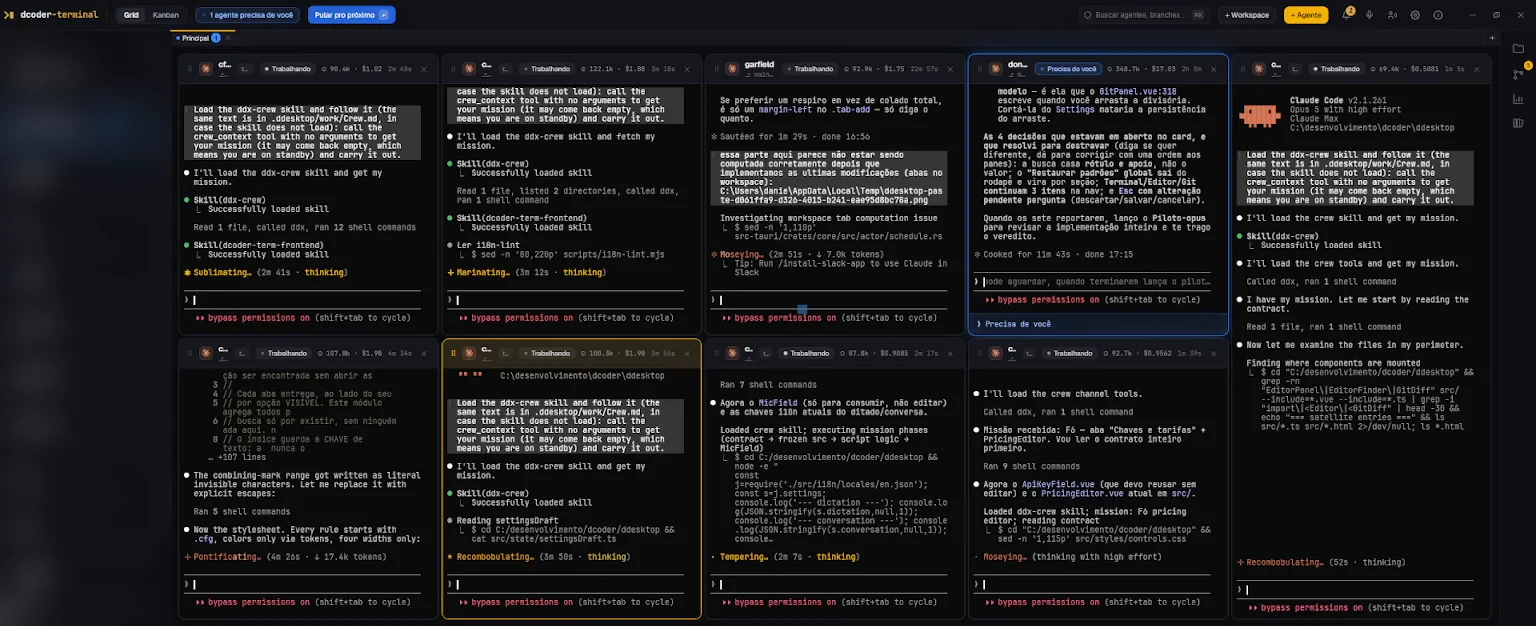
A real working session in dcoder-terminal: pilots, their crew, and the cost of every pane in its header.
It runs the agent CLIs already installed on your machine.
Claude Code
opencode
Codex
Antigravity
dcoder-agent
Kimi
Grok
Copilot CLI
deepclaude
mimo
Cursor Agent
Qwen
MiniMax
any shell
Eight of them are first class: the app plugs into their lifecycle, so the board knows when one finished or stopped to ask you something, and session cost shows up live. The rest run through a command you write once.
Every piece of work goes through the same five steps.
Opening five terminals is easy. Keeping five agents pointed at the same goal, without undoing each other, is what needs a method. dcoder-terminal is built inside dcoder-terminal, with these five steps.
01
Specify
You argue the work out with the pilot agent before anything runs. It writes the PRD, then cuts it into cards carrying a plan, acceptance criteria, an actor and dependencies. Cards land in the Backlog, and nothing starts until you promote one to the Queue.
The PRD holds the why, the cards hold the work
Write the acceptance criteria while the card is still cheap
Nothing leaves the Backlog until you promote it
The board with the PRD rail across the top and the Backlog full of cards.
02
Allocate
Each card names its actor: which CLI, which model, how much effort, which permission mode, and which skills and MCP servers the agent gets to see. An expensive model plans and reviews while a cheap one runs the slice you already specified. Every pane header shows the time, and tokens and dollars on the integrated CLIs.
The model is chosen card by card
Effort, permissions and tools travel with the preset
You watch the dollars while the card runs
Pilots on Opus next to their crew, each header carrying its own tokens and cost.
03
Run in parallel
You set how many workers may run at once. A card whose dependencies are met takes a free slot, opens in a pane of its own and gets its briefing. The pilot also opens crew members outside the board, each with a written mission and its own slice of the files.
Dependencies hold a card until the one before it closes
Every worker gets its own pane and its own briefing
Each crew member gets a mission and its own slice of files
The pilot pane with a table of slices and the files assigned to each one.
04
Verify
A finished card stops in Review instead of going straight to Done. A different agent reads it against the acceptance criteria and either approves it or sends it back to the Queue, with the rejection written on the card as a note. The round counter goes up every time.
Whoever did the work cannot promote it
A rejection comes back in writing, on the card itself
Rounds are counted, so a card that keeps bouncing shows
The card editor on the Notes tab: the reviewer approved, with every acceptance criterion checked.
05
Decide
An agent that needs an answer stops and says so. The top bar counts them, Skip to next takes you straight to the pane that asked, and the system notifies you when you are somewhere else. You answer by typing or by voice, and what the agent learned goes into the project memory for the next one.
The top bar says how many agents need you
Skip to next jumps straight to the pane that asked
Manual cards move only when you or the pilot move them
A pane stopped at Needs you with a numbered list of options, and the top bar reading 1 agent needs you, Skip to next.
Everything you would leave the window for is already in it.
Alt-tabbing while six agents are running is the fastest way to lose the thread of what they are doing. These four exist so you stay put.
Git
One Git window for every repository in the project, and it finds all of them under the folder. Worktrees, a three column merge editor, staging by hunk that refuses a stale hunk, a commit message written by AI with secrets redacted, force push with lease.
The Git window with the file tree, the diff of the selected file and the commit box.
Editor and files
Monaco with a file tree, quick open and project wide search that respects your .gitignore. Send a selection to the agent in focus, or drag a file onto a pane to hand over its path.
The editor with the file tree on the left, open tabs and a file being read.
Skills
A shelf in a window of its own. Drag a skill onto a pane and the instruction is typed there without submitting, and without taking keyboard focus away from the terminal.
The skills shelf in its own window, each skill ready to be dragged onto a pane.
Voice
Global dictation with a HUD over any window, push to talk or toggle, and the transcript lands in the pane without pressing Enter. Conversation mode talks in real time and acts on the app, asking first when the action is destructive.
The dictation HUD over the window, with the transcript still editable before it goes in.
You buy a seat, and the tokens stay on your own account.
Here is what the bill looks like, and what actually leaves your machine.
What you pay for
Your own Claude, Codex or Copilot subscription, used directly
List price from the provider, with nobody in between
A model chosen per card, so cheap work runs on cheap models
Time in every pane header, and tokens and dollars on the integrated CLIs
Rates you can edit, which re-price the history you already have
What leaves your machine
The licence check, and nothing else, talks to us
Your code and your prompts are never sent to us
Repository, project and card names stay on disk
The board lives in your project folder, never on our servers
Model traffic goes to the provider you already configured
The check runs every ten minutes, and the app keeps working for up to 72 hours without it. Silence is tolerated, refusal is obeyed.
And you see the bill while it happens
Input, output and cache tokens accumulated per model per session: the token count is the primary record, dollars are derived from a rate table you can edit. Change a rate and it re-prices the history without reprocessing a single transcript.
sonnet-4.5
1.84M
$3.02
gpt-5.5
0.42M
$1.15
opus-5
0.19M
$2.44
One plan, priced against a seat instead of your usage.
The app is the subscription, and tokens never pass through us. It is the smallest line on your AI bill, and the only one that stays put when you open another terminal.
Founding price
$19$15/ per month
Locked for as long as you stay subscribed. It does not rise to $19 under you.
Billed in your local currency, with tax added at checkout where it applies. Cancel any time, and the licence runs to the end of the period you paid for.
Everything, from day one:
Real terminals in a grid, any interactive CLI
14 agent CLIs, eight wired into the agent lifecycle
A durable board in Markdown, inside your repository
PRDs, specs and the pilot agent
A scheduler with as many slots as you allow
An AI review gate before a card closes
Crews with a written mission and files of their own
Loop cards, continuous or on a cron
Shared project memory every agent reads and writes
Global dictation and conversation mode
Git window, editor, file manager and skills shelf
Windows, macOS and Linux
What people ask before subscribing.
Does the subscription include model tokens?
No. You use the subscriptions and keys you already have, Anthropic, OpenAI, OpenRouter or whoever, and you pay the provider directly at list price. We orchestrate the work and show you, in dollars, what each model spent. The seat is the only thing you buy from us.
Is this vibecoding?
Vibecoding is accepting whatever comes out. Here the work is specified before it starts, every card carries acceptance criteria, and a second agent checks the result against them before the card can close. Some people call a pile of parallel agents a swarm. The difference is that you wrote down what this one has to do.
What changes in the way I work?
You write more and you type less. The first hour of a feature goes into arguing it out with the pilot and cutting cards that say what done means. After that you are reading, deciding and approving while several agents work. The habit that disappears is babysitting one terminal at a time.
Does my code leave my machine?
Not to us. The board is a .ddesktop folder inside your project, plain Markdown and JSON, and the panes are processes on your machine. You decide whether to commit that folder so the team sees the board, or to ignore it. What does go out is what the agent you chose would send anyway, to the provider you configured.
What exactly does the licence check send?
Five fields, every ten minutes. device_token, a random value we store only as a hash. fingerprint, a hash of the machine id, so a copied config folder cannot hold two seats. device_name, whatever you called this machine. app_version, the build that is asking. seat, the one you are holding. Nothing about your code or your projects is in there.
Do I need to be online?
To start, yes: the app borrows a seat when it opens. After that it keeps working for up to 72 hours without reaching us. Silence is tolerated and refusal is obeyed. If we cannot be reached, you carry on. If we answer that the subscription lapsed or the pool is full, the app says so and stops.
Can I use it on more than one machine?
Yes. Registering machines is free and unlimited. A seat is lent while the app is open and returned when you close it, so the desktop at home and the laptop at work share one licence. What a seat counts is simultaneous use: two apps open at the same moment need two seats.
Won't two agents in the same repository trip over each other?
They can, if you set it up that way. Dependencies are how you stop it: a card waits in the Queue until the one before it closes. By default the scheduler runs one worker per workspace, and you raise that when you want more. Crew members are handed separate slices of the files in their missions, so they do not write over each other. The app never touches git on its own, so branches and merges stay your decision.
How does the app know an agent finished or got stuck?
Because the agent says so. Every terminal gets a small tool it can call, and the briefing injected at the start teaches it to mark its own card: working, waiting with a question, done. Nothing here guesses from the text on screen.
Does it install or replace my agents?
Neither. It runs the CLIs already installed and already authenticated on your machine. If typing claude in a terminal works today, it works here. What it does write is its own board tool into each agent's config, in the narrowest scope it can, without overwriting what you had there.
Which service do dictation and conversation mode use?
OpenAI's, with your own key, kept in the operating system credential vault instead of a text file. The estimated cost shows on screen while you speak. Conversation mode can act on the app, and it asks before anything destructive.
What happens if I cancel?
The licence runs to the end of the period you paid for, then the app stops opening. Everything on disk stays yours. The board, the PRDs and the notes are Markdown files, readable with or without the app.
Point it at a repository and the first card runs today.
You already pay for the agents. This adds the board, the review, and the window where you watch all of it happen.